

Attribute Functions Reference
Use these functions and operators to build Formula attributes in Builders > Attributes. The formula editor suggests functions, Application Data, data-service attributes, and Custom Attributes as you type. Hover over a function to view its expected arguments.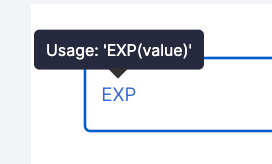
...values indicates that a function accepts multiple values. Where an alias is listed, you can use either the named function or the operator.
Logic and comparison
Blank, type, and error checks
Arithmetic
Aggregates, counts, and statistics
Rounding and logarithms
Financial
Text
Date and time
Lookup, arrays, and evaluation
Higher-order functions
FAQ
Can I paste a formula from Excel or Google Sheets?
Can I paste a formula from Excel or Google Sheets?
Yes. Paste the formula into the editor, then replace spreadsheet cell references and unsupported functions with Lendflow application data, data-service attributes, Custom Attributes, and supported functions.
Can I use symbols instead of named functions?
Can I use symbols instead of named functions?
Yes, when the table lists an operator alias. For example, use either
ADD(left, right) or the + operator.Why does the editor show a dotted outline?
Why does the editor show a dotted outline?
The editor does not recognize that function or value. Select a supported suggestion or replace it with one of the functions listed on this page.
How do I configure a function or value with a yellow gear icon?
How do I configure a function or value with a yellow gear icon?
Select the icon and provide the required context, such as a date range or score model.
Next steps
Custom Attributes
Create, evaluate, publish, and use a Static or Formula attribute.
Data Orchestration
Use Formula attributes in a Data Orchestration template.
Creating Scorecards and Scorecard Groups
Add published Custom Attributes to a scoring model.